------------------------------------------------------------------------------------------------------------------------------

Latest Articles


Showing posts with label Softwares. Show all posts


Right now we have Opera Mini, that’s mostly meant for devices with small screens and low processing power and Opera Mobile for the more capable smartphones. And pretty soon we’d be enjoying a new version of the popular mobile browser, designed with tablets in mind.

With the slates popularity skyrocketing, it’s no wonder Opera wants to be a part of that market too. Тhe good thing is they are doing so with a completely new app rather than just upsizing one of their old ones. So far we’ve only got a short video of the new browser demonstrating its smooth scrolling and panning on a Galaxy Tab, but more is promised to follow soon.


I don’t see too many changes in the user interface, but maybe it’s just an early version and things will change. Or it could be that those early glimpses are just misleading.

We’ll have to wait a while to find out I guess – at this stage Opera doesn’t even give us an estimate on when their browser might be available.
Read more...


I’m sure you don’t need to hear about mobile gaming evolution over the last few years once again. The Sony PSP and the Nintendo DS pocket consoles have millions of fans and some really good titles, but mobile phones, and especially the iOS devices, keep threatening their existence. Every new iDevice eats deeper and deeper into their sales.

The introduction of the iPhone 4 and the Apple iPad this year marked a turning point in the iOS evolution. Thanks to the superior hardware of these devices – proper processing power and high resolution – we can now play mobile games we’ve only dreamt of before.

The Apple gadgets don’t have the means to be a game changer (pun intended), but they are preferred by millions of users and the AppStore gaming demand grows by the day. This, of course, brought us lots of quality game titles in 2010.

Here are the games that deserved my money and might easily get yours.


Angry Birds


There is no doubt the cute angry birds made unprecedented impact on mobile gaming. It’s perhaps one of the most popular mobile games up to date (regardless of platform).

Rovio keeps updating Angry Birds regularly, adding new levels, themes and golden eggs. The best part is none of these big updates requires you to pay for it. The developer even offers an ad-supported version of the game for free in the Android Market.

The Angry birds created a formula that won them more than fifty million iOS, Android, Symbian and Palm fans around the world. After Angry Birds, the arcade games on a mobile phone will never be the same.


Infinity Blade


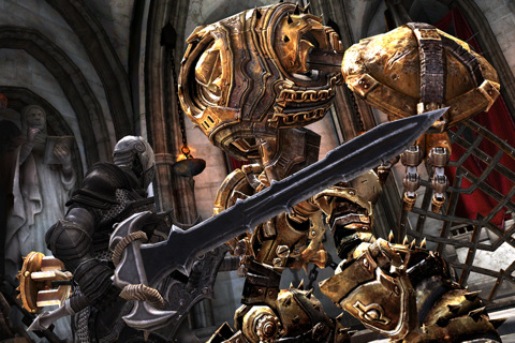
Unreal Engine 3 on the iPhone? I never thought we would see those awesome graphics on a phone so quickly. But Epic did it and brought its magic to the Apple gadgets.

The Infinity Blade is the first game using the new graphics engine. It’s an RPG with decent story, lots of weapons and some unique gameplay. I’m sure the graphics are its key feature, but Epic/Char have managed to give us a really good game. Once you enter the world of Infinity Blade you’ll be staying there for hours.

We are promised regular free updates with new places to explore and new weapons. The game is not too expensive either, so I suggest you check it out.


Rage HD


After Epic ported its Unreal Engine on the iOS, it was id’s turn to port the Rage graphics.

Rage HD is as beautiful as Infinity Blade (sometimes even better) and is set in the same universe as the upcoming PC/X360/PS3 first-person shooter Rage.

The Rage HD is a rail-based first person shooter, where you move on a rail track and your only job is to look around and shoot. There are lots of blood, zombies, weapons, ammo and health packs.

Rage HD has only three (completely different) levels, but it’s a very cheap game and it’s also lots of fun. I’m sure most of the FPS fans will appreciate it. There is no info on updates though.


Plants vs. Zombies


Plants vs. Zombies is another game that made a serious impact. It’s as simple as most of its tower defense siblings, but offers unique approach to the genre and some cute graphics.

Similar to Angry Birds, the success of the Plants vs. Zombies is because of the right setting and atmosphere plus the simple gameplay. If you love tower-defense games, you should definitely give this one a chance.


Cut the Rope


I’m pretty sure the iOS version of this game was created with the intention of stealing some of the Angry Birds’ pie. In the end, it did manage to grab a bite and succeed where many others have failed.

Cut the Rope relies on more physics than Angry Birds, but it’s got an equally simple gameplay.

Similar to Angry Birds there are regular free updates adding more levels and elements. If you want to see it in action, there is a free Christmas edition with 25 levels.


Dungeon Hunter 2


Everyone who has played the first Dungeon Hunter will definitely get this one. Dungeon Hunter 2 offers better graphics than its predecessor and almost the same gameplay. It’s a typical hack’n’slash RPG, where you explore dungeons, battle with different creatures, collect items, develop your character and open chests.

It’s pretty much Diablo for iOS. If you like that type of games, then Dungeon Hunter 2 offers the right mix.


Dark Nebula: Episode 2


The Dark Nebula episodes are accelerometer-based games with a really simple objective – get the ball through a series of holes, deadfalls and whatnot. We’ve seen plenty of those, but instead of the usual maze, this time around the ball makes its way through complicated high-tech levels overcoming various challenges including moving platforms and deadly robots. And just when you thought you’ve got the heck of it, the game always throws some surprising new gameplay tasks.

Episode 2 supports Retina graphics, packs 20 levels (compared to 10 levels in Episode 1) and introduces the jungle terrain. All the new levels feature even better design and bring new gameplay elements.

Both Dark Nebula versions are as cheap as they get and are many users’ favorites.


Hector: Badge of Carnage


There aren’t so many original quests these days. In fact most of the current quest titles are just remakes of some old ones.

But here comes Hector to save the day. It’s a hilarious and easy to play game that features a mix of real detective work, ridiculous conversations, even more ridiculous but interesting characters, an unbelievable police detective and other crazy stuff.

I personally laughed my way throughout the whole game and I highly recommend it. It’s entertaining, cleverly designed and generally hilarious – something you don’t see every day.


Cat Physics


If you like puzzles and physics, you may also like Cat Physics. There are two cats, one ball and various obstacles through the level. You have a few arrows that will throw the ball in the direction they point. Your objective is to position those arrows on the level properly and get the ball to the opposite cat. The shorter the path is, the more points you get.


Need for Speed: Hot Pursuit / Real Racing 2


The PC/X360/PS3 version of NFS: Hot Pursuit didn’t impress me as much as I expected, but the iOS one has definitely won me. You can play on both sides (police or racer) and it has already been updated with the career mode. It’s very similar to its bigger brother, but doesn’t have the same huge claims for perfection.


If you search for an alternative racing game, I suggest you try the Real Racing 2. It has some awesome graphics, cars and nice tracks. In fact it somehow reminds me of the Grand Turismo. The bad news for those of you that want to try it is that it is on the expensive side.


Battlefield: Bad Company 2


Every Battlefield fan will probably get the mobile version of the Battlefield: Bad Company 2 no matter what I say here. But since I’m mentioning it in this list of my favorite games, getting it might as well be a wise decision. Everyone else who loves good first-person shooters might want to at least check it out.


Shadow Guardian


he next game is s like Uncharted on a mobile phone. Shadow Guardian has very similar gameplay to the PlayStation 3 top-selling titles. It’s an adventure stacked with actions, easy puzzles, various locations, interesting story, ancient mysteries, etc.
Every fan of Uncharted, Tomb Raider and similar games will like this one.

I also intended to include the recently released Lara Croft and the Guardian of Light and Aralon: Sword and Shadow, but those games are still full with bugs, they crash often and can get you a headache. Until some critical updates are released, those two aren’t worth your money.

The technology is evolving with rapid speed nowadays and I bet 2011 will bring us even more beautiful and entertaining titles. There are new iGadgets coming, the dual-core processors already entered mass-production lines, so I expect the mobile gaming experience to jump on the next level.
Read more...


Guess what, the voice search functionality has just arrived to the Chrome web browser and similarly to the Android voice search functionality you can input text in the search box and even text fields. Thanks to the Voice Search extension you are now capable of voice input on every search box in the web. Just click on the mic icon and speak in your microphone.

There are a few preloaded services into the Voice Search – Google, Wikipedia, YouTube, Bing, Yahoo, DuckDuckGo and WolframAlpha. But you can always add your custom commands in the list.

The Voice Search is experimental so it might have bugs or not recognize some words properly, but most of the comments are quite positive at this time.

If it’s not working on your Chrome (Chrome 9+) you will need to add --enable-speech-input to the Start In line.

The add-on is free and is available at the Chrome Extensions page and at the Chrome Web Store.
Read more...


The 360 browser has hit version 2.0, which adds new features ranging from performance improvements, through a download manager to Firefox Sync support. It’s an alternative iOS browser and not an Xbox 360 browser despite the name – the "360" comes from the clever, circular layout of the menus/submenus on screen...

The 360 Web Browser supports plug-ins, one of which enables Flash videos on iOS devices. It only works on videos and re-encodes them before sending them to the device, but it can still be very useful if you want to use a video-sharing site other than YouTube.

Version 2.0 of the 360 browser adds support for Firefox Sync, which lets you sync bookmarks, passwords and open tabs between the phone and the desktop (move over Firefox Home).

Other new features include a download and file managers, plus file sharing and search suggestions. Check out the video below to see the clever menus in action:


The 360 Web Browser supports iPod, iPad and iPhone (including the iPhone 4 and its high-res Retina display) and can be had for $0.99 from the App Store. Also check out the developers’ blog, they are eager to answer any questions you might have.


[Source]
Read more...


Microsoft has finally released the official sales figures for the Windows Phone 7 smartphones. At 1.5 million units to date those aren’t as impressive as the iPhone’s, but sure sounds encouraging.

In a short interview Achim Berg, a corporate vice president at Microsoft, unveiled that the WP7-powered devices are selling well enough, reaching 1.5 million sold devices worldwide in just a few weeks. Take that KIN One. You too, KIN Two!

Another interesting detail concerning the Windows Phone 7 platform is the number of apps currently available in the Windows Marketplace.

There are some 4000 apps at your disposal and a team of 18 000 developers is working on exciting new ones as we speak. To read the full interview, just follow the source link below.


[Source]
Read more...


A major update to Google Maps has just hit the Android market. Version 5.0 of the Google digital map software brings in vector graphics, cool new 3D features and offline navigation.

So starting today instead of a series of small stitched together image tiles, Google Maps will be dynamically drawing vector graphics. This means that instead of pre-rendered images, Maps are rendered on the device itself, making scaling and transitions way smoother.

Next come the 3D interactions that are possible thanks to the two newly implemented multi-touch gestures. Dragging down with two fingers will tilt the map and switch between 2D and 3D view, while twisting your fingers will rotate the map.
There’s also compass mode enabled in Google Maps 5.0 allowing you to look around by simply panning around with your phone.

Finally there’s the offline navigation or as the Google dev team calls it “offline reliability. It allows Google Maps to reroute you if you leave your initially calculated track even if you don’t have internet access during navigation. You still need internet access before you start navigating though.

Google Maps 5.0 is available to Android devices running version 1.6 (Donut) or later but the 3D features and offline navigation are only accessible on 2.0+ (Eclair) handsets. Now start updating!


[Source]
Read more...


Sony just announced that it will launch a PlayStation app for all iOS 4+ and Android 1.6+ devices. The app will give existing users of Sony’s consoles access to their PSN profiles, trophies and online statuses. Other than that it will be useful for keeping up with all the latest PlayStation news, games and announcements.

The new PlayStation app will feature similar user interface as the PlayStation 3 and PSP.

The first version of the app should be released soon in UK, France, Germany, Spain, Italy and The Netherlands and it will be free on the AppStore and the Android Market.

Sony is already working on a next version of the app with even more features, supported countries and languages.


[Source]
Read more...


The Gmail web app for iOS and Android has been updated today. The latest version of the mobile Gmail is now available in 44 different languages.

The supported languages are Arabic, Bulgarian, Catalan, Chinese (Traditional and Simplified), Croatian, Czech, Danish, Dutch, English (UK and American), Estonian, Filipino, Finnish, French, German, Greek, Hebrew, Hindi, Hungarian, Icelandic, Indonesian, Italian, Japanese, Korean, Latvian, Lithuanian, Malay, Norwegian (Bokmal), Polish, Portuguese (for both Portugal and Brazil), Romanian, Russian, Serbian, Slovak, Slovenian, Spanish (for both Spain and South America), Swedish, Thai, Turkish, Ukranian, Urdu and Vietnamese.


If your language is in the list, just go to gmail.com from your Android/iOS device and you’ll feel at home.

Besides the localizations, you’ll also get offline support, smart links, labels and overall layout improvements.


[Source]
Read more...


There are two ways to tear down a Cr-48 netbook – the right one and the rough one. One user has already disassembled the first Chrome device and the insides are pretty much the same as I suspected.

But Google took the tear down to a whole new level. It destroyed brutally 25 Cr-48 netbooks in some crazy ways and shot the entire thing on video. Watch!


The purpose of this demonstration was to show us that no matter happens to our netbook, all of our data will be safe. It isn’t something we didn’t know from day one, but now I’m sure there will be no doubts.

The disassembled Cr-48 reveals an Atom N455 1.6GHz dual-core processor, 16GB SanDisk SSD and Hynix RAM chips (possibly 1GB). Perhaps the 16GB-only disk explains the incapability of dual-booting Chrome OS with Windows – there is not enough room for both.

Here are the pictures:


Google Cr-48 insides

Looks just like any other oversized netbook, right?

Anyway, the first retail devices will hit the shelves in mid-2011 and their specs might be surprisingly different from the Google’s test netbook.


[Source]
Read more...


Infinity Blade – an action RPG game with killer graphics developed specifically for iOS – is rolling out to iTunes stores (it just hit the US store, for instance) and I took it for a quick spin. It really delivers in the graphics department but you might want to play it on the iPad instead of an iPhone...


The player takes control of a knight with a long, sharp sword that takes on evil Titans. During sword fights you have pretty good control of how your knight wields the sword – he will swing his sword in the direction you swipe and as the game goes on you’ll learn combos, which are more efficient and do more damage.

The typical RPG elements are included – upgrading your gear, learning skills and spells and looting for items. In between battles though controls are quite limited – you tap on circle that marks a possible action and watch a cut scene of your character going there.


Still, the battles are pretty good – you’ll soon learn that swiping one way over and over again is not the way to go. The correct swing at the correct time, followed by a block is essential to surviving – those titans are really huge and intimidating.

Infinity Blade features a single player campaign and once you get good enough of the single-player action, you can jump into the Game Center and find other people to battle online. The game uses the Unreal 3 engine to render its impressive graphics and runs very smoothly (at least on the iPhone 4).


Infinity Blade costs $5.99 and weighs in at 318MB – it’s available for the iPhone 3GS and 4, iPod touch (3rd and 4th gen) and the iPad (even older iOS 3.2). The iPad may be the best option – the graphics is too good for a small 3.5” screen and you’ll need plenty of room for swiping more complicated attack patterns and combos.

Here’s the game’s trailer if you’re still not convinced:


[Source]
Read more...


The Google dev team has just announced the availability of the new YouTube app for all Android devices running on Froyo and the Gingerbread-powered Nexus S. Packing a completely redesigned user interface YouTube 2.1 for Android aims to bring you the complete desktop experience without needing to use the browser.

The key new feature brought by the YouTube 2.1 app is the in-page playback, which allows you to read video descriptions, check-out related videos, rate and post comments, while the video is playing.

Another important update is the new full-screen UI, which allows for easier and more precise forwarding and rewinding (the so-called “scrubbing”) of the currently playing video. Accessing videos from the channels you have subscribed to has also been made easier as they now pop up on the top of your recommended video list at the app start screen.

Check out the new app in action in the following short video.


[Source]
Read more...


It was more than a year ago, since Google announced Chrome OS and presented its concept about the future of the netbooks. Following the Nexus S announcement on Monday, Google held another event yesterday – showcasing the latest in Chrome OS development.

Google is starting its Pilot program and its participants will receive the first Chrome-running netbook – Cr-48. It has no Fn keys, no Caps Lock, no optical drive and no spinning hard-drive either. But you get 12-inch netbook with Wi-Fi, 3G, an oversized touchpad and a webcam. The Chrome OS boots about 10 seconds on the Cr-48 and resumes from sleep state instantly.
The Cr-48 promises excellent battery life – 8 hours of work or 7 days in standby mode. Unfortunately, the Cr-48 netbook will be available only to the participants in the Pilot program and no one else.

There is also one more thing to know about the future Chrome-running netbooks – they won’t be able to dual-boot with Windows OS. I suppose either the flash storage won’t be enough to host another OS or there will be some explicit restriction.

Another thing that is left out is the Caps Lock key. There will be a dedicated Search shortcut instead. I don’t mind that, but I’m sure lots of users will do. Google claims it’s doing this to improve the comments’ quality, but I believe nothing will fix the behavior of some commenters.

Samsung and Acer have confirmed that their Chrome netbooks will be released in summer 2011 – those will be for mass consumption unlike the Google’s Cr-48.
And now let’s see what to expect from the Chrome OS.


What is Chrome OS?

First of all the Chrome OS is completely cloud-based operating system that works within a (Chrome) browser. You can run it on any Windows or Mac computer or use it on a dedicated netbook (such as the Cr-48). The Chrome OS is the Google vision for the future of always-connected netbooks.


Chrome OS

So basically if you want an ultra-cheap, but capable netbook – a Chrome-based one should be your choice. In any other case you can run the Chrome OS within your browser, so no one could criticize Google about requirements, policy, etc.

Profiles

When the Chrome OS starts you must log in with your profile. It’s not stored locally, but in the cloud, so it doesn’t matter where you are logging in. That way you have access to your stuff no matter the computer you’re using. If you’re using a Chrome-based netbook, you can make guest accounts that will store no personal data after the guest user logs out.

The Chrome OS login screen

Apps and Store

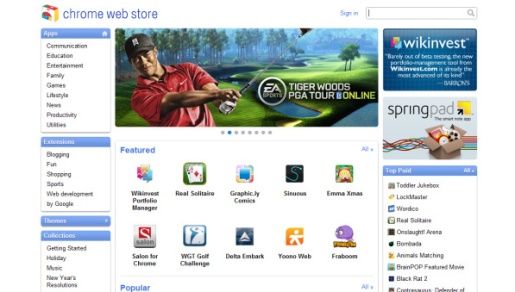
You can get apps for the Chrome OS from the dedicated Chrome Web Store, which has already gone live. Its UI reminds me of the iTunes Store, but the apps you choose run directly from the Web Store. You click on the app of your choice and you have it instantly. Every app runs in a separate browser tab, but there is full screen mode too, so you won’t lose the line between the browser and the apps that much.


Despite the fact the apps also run on the cloud servers, they still use the processing power of your machine and take advantage of both CPU and GPU. This means that the Chrome OS is still capable of running some heavier applications such as office, image editing/processing or even some 3D games.

Desktop

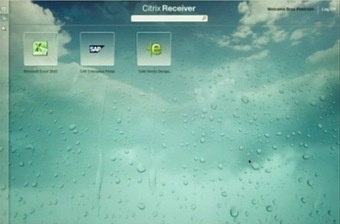
Google has worked closely with Citrix to bring a service for easy deployment of desktop applications. The result of that collaboration is the Citrix Receiver. Thanks to that application, it’s now possible to deploy desktop applications such as Microsoft Word or Excel on Chrome OS.


Performance
The performance on Chrome OS is a key feature and Google has tried to make the core systems lightning fast. Chrome OS boots on a dedicated netbook for less than 10 seconds, while the resume process is instant.
Because everything is web-based, your computer won’t be filled with files and won’t need to use so much processing speed for the apps. Also the installation and the update processes are extremely easy – you install an app with just one click, while the updates are automatic and you won’t even notice them. Google also promises regular updates, which will be always focused on performance.

Printers

Chrome OS (and Chrome browser) will support cloud printing too. This service allows you to print on any printer connected to any computer in the world, it just needs to be registered on the Google Cloud Print. The service is already available for the Chrome web browser, but you’ll need to get Chrome 9 beta to use it.

Let’s see some action

Most of the available apps in the Web Store are just links to popular web apps, but there are a few that are actually dedicated Chrome OS apps and work only under Chrome OS. They look excellent thanks to the new web tech such as HTML5 and deserve a proper attention.

Aviary is an image editor and yes, it runs within your web browser. It has most of the functionality an average user needs and it does really well.


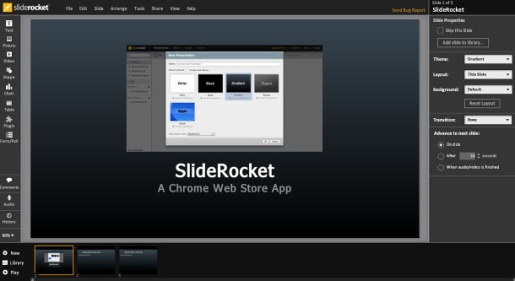
SlideRocket is like Power Point – you can make beautiful presentations and even add various multimedia to them.


TweetDeck is an awesome social networking client exclusive to Chrome OS. Just watch the video.


Well, that covers pretty much everything new. The Chrome OS is still in development but it’s nice to see they’re getting there. Since the first netbooks are scheduled for mid-2011 release, I guess the Chrome OS will launch some time before them. I’m sure there will be an opened beta test after a few months.


[Source 1], [Source 2], [Source 3], [Source 4]
Read more...


Software porting is pretty common in the world of WinMo and Android while Symbain users have much to catch up. Luckily, there have already been a handful of Symbian smartphones enabled to run other handset’s firmware, including the Nokia 523x family, which has just been treated to the latest Nokia C6 firmware.

Nokia isn’t one of those companies that stop releasing software updates soon after launching a mobile phone so normally, users just don’t need to even think of porting one handset’s firmware to another. All they have to do is wait a bit for the next FW update full of bug fixes to arrive.

Still, in some cases the bugs (such as battery life issues, RAM management, overall performance, etc.), aren’t fixed properly or at all even via the robust update program. This is where ported software comes in handy.

And Nokia 5230 (along with its semi-clones, the 5228, the 5232 and the 5233) is yet another example that FW porting isn’t a no-go for Symbain-powered smartphones too.
Here comes the proof: a video of Nokia 5230 running the firmware of a Nokia C6:


Of course, because of the numerous hardware differences between the two handsets there are plenty of bugs (known and unknown) that need to be fixed. And also keep in mind that this isn’t a harmless procedure and you might void your phone’s warranty.

However, if you’re still interested in giving the PNHT team‘s BETA port a try, follow that link, do the necessary reading and get the files you need in order to get the porting started.
Read more...


Today Windows Phone 7 developer team’s blog announced that the platform is just about to reach the 3000 app milestone. Sure, the number might sound petty in comparison to virtually every other smartphone platform out there but the growth rate is actually quite impressive.

Windows Phone 7 Marketplace had just 1 000 apps exactly 22 days ago so it has been getting an average of 90 apps per day since then. And the total number of developers that plan on releasing some kind of WP7 app has exceeded 15 000, which is quite impressive, considering that WP7 handsets have only been available for a month.

Android was accepting applications at this rate last November (more than a year after the G1 was released) and even the omnipresent App store got 3000 apps in one month in October 2008 (17 months after the first iPhone was introduced). So, while Windows Phone 7 certainly has a lot of catching up to do it might be up to speed faster than anyone expected if the exponential growth rate continues. Microsoft would need to release a few updates and shorten that ridiculously long list of limitations before that, though.


[Source]
Read more...


Don’t give up on the Symbian gaming just yet. Gameloft just launched five games for the latest Symbian^3 platform – Asphalt 5 HD, Avatar HD, Hero of Sparta HD, Guitar Rock Tour 2 HD and GT: Racing Motor Academy HD.

As you can guess the HD tag in the names doesn’t mean the games run at 720p or similar, it just marks their premium status.

The smartphones currently running Symbian^3 are Nokia N8, C7, E7 and C6-01, where only the first two are available on the market. Here, enjoy the demo video of the games and give us your thoughts in the comments.


[Source]
Read more...

"Adobe show how HP Slate does Flash, heap pressure on the iPad"


Adobe published a thorough video of HP Slate demonstrating its Flash capabilities. It turns out watching full-length TV shows, playing games and browsing Flash-heavy websites are no problem for the HP tablet.


The fact that HP Slate will handle Flash is hardly a surprise with it running a full-fledged Windows 7 desktop OS. The main concerns were however if the performance will be okay. And as far as this video goes, there’s really nothing to worry about.


From what I can see the HP Slate handles all Flash stuff flawlessly. Let’s just hope the final product will be at least as good as in this demonstration. Excellent design, multi-touch and a home-brewed interface, great performance and fully capable OS without user restrictions – this is what HP Slate will offer. iPad may start shivering right now.
.
Read more...

Most Popular Posts


Follow us on Facebook Follow us on Twitter Follow us on Google Buzz GenCept on Stumbleupon Follow us on Digg Follow us on Youtube Subscribe to ous RSS Feed Subscribe via E-mail
Creative Commons LicenseGenCept by http://GenCept.com is licensed under a Creative Commons Attribution-Noncommercial-Share Alike 3.0 United States License.
Permissions beyond the scope of this license may be available at http://creativecommons.org/about/licenses/.

.